How Overwatch 2 menu groups map to in-game decisions
Editorial · Published 29 Sept 2026
In this guide
Who this is for
If you play Overwatch 2 in role queue, you already juggle tank space, support cooldowns, and two damage slots in a 5v5 lobby. Search results for “OW2 cheats” still surface posts written for the old six-stack meta, console code myths, or menus copied from other shooters.
This article maps the four groups on our product page—Aimbot, Visuals, Hero scripts, and Misc—to how an Overwatch 2 match actually flows: control and flashpoint fights, payload corners, high ground on maps like Ilios and Dorado, and ult trades around kits such as Nano Boost, Sound Barrier, and Graviton Surge. It is not a full toggle list; that stays on the product page.
Aimbot: hitscan, projectiles, and team fights
Our published Aimbot list includes tracking and flickbot modes, trigger bot, hitbox scale, bone targeting (including closest bone), prediction and gravity prediction for arcing shots, ally targeting, dynamic FOV, target lock, and separate FOV rings per mode. That maps cleanly to OW2 gunplay: hitscan heroes such as Soldier: 76, Cassidy, Widowmaker, and Sojourn want different smoothing than Pharah rockets, Hanzo arrows, or Junkrat lobs.
In a 5v5 fight, your crosshair is rarely the only variable. Barriers from Reinhardt or Sigma, Ana sleep or anti-nade, and knockbacks from Lucio or Doomfist break a lock. Wider FOV helps when multiple bodies stack on a payload; narrower FOV feels closer to manual duels on flank routes.
Aim assistance does not read cooldowns for you. Knowing whether the enemy support still has Resurrect, or whether their tank burned Rally, still decides whether you take a 1v1 on high ground. Use aim modes as one layer—not a substitute for ult tracking and positioning.
Visuals (ESP): heroes, ults, and off-angles
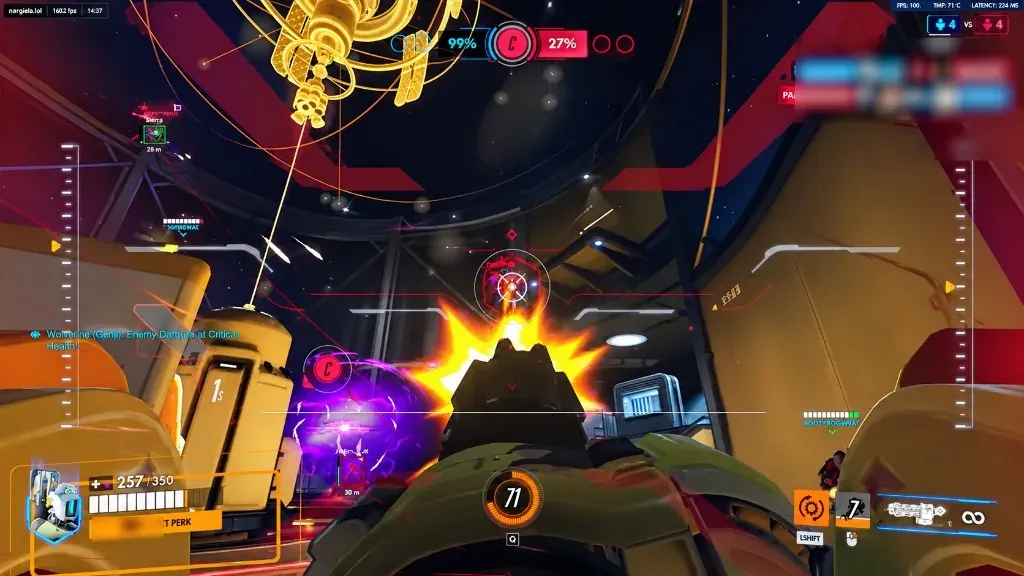
The Visuals group on our product page lists player info, skeleton, ultimate charge overlay, glow (including HP and rainbow modes), enemy view angle, 2D/3D/cornered boxes, snap lines, drawn FOV rings, per-toggle styling, and target highlight. In Overwatch 2 that information answers match questions audio alone can miss: which flanker is on your back line, who still has ult on the enemy back line, and whether someone is holding an off-angle above the point.
Ult charge overlays matter because OW2 fights are short and loud. Seeing that the enemy support is near Sound Barrier—or that their Reinhardt is close to Earthshatter—changes whether your tank commits to a control point contest. Cooldown readouts and hero ESP-style labels are why many players enable visuals before they touch aim modes.
Glow and box styles are preference, but the game context is the same: vertical maps, doorways, and payload bends hide threats. For streamers, streamproof lives under Misc, not Visuals—capture software is separate from what you draw in-game.
Use the product page for the exact visual toggles we publish; do not trust screenshots from other games or older OW1 menus.
Hero scripts: kits listed on the product page
Hero scripts are optional automations tied to specific kits—not a replacement for learning ability timings in the hero gallery. Our published list includes global auto-melee plus hero-specific chains for Genji, Tracer, Roadhog, Sojourn, Reaper, Mei, Widowmaker, Zarya, Doomfist, and Hanzo. Names match the product page; if a hero received a rework in a Blizzard patch, treat scripts as something to re-test, not a guaranteed combo.
These behave differently from Aimbot sliders. A Genji blade chain, Roadhog hook follow-up, or Tracer blink pattern is about ability sequencing; Sojourn rail or Hanzo storm arrows still depend on the same map geometry and shield break timing as any other damage hero. Enable one script at a time, read the label on the product page, and practice in Custom Games or vs. bots before you queue ranked.
Misc: FOV, presets, and role queue swaps
Misc on our menu covers override in-game FOV, streamproof rendering, and saving or swapping config presets. Overwatch 2 already lets you tune sensitivity per hero; presets extend that idea to which cheat groups are on when you swap roles.
Role queue means you might play tank one game and support the next. Tank lobbies reward wider awareness on payloads and chokepoints; support lobbies reward ult tracking and peel lines; damage lobbies mix hitscan angles with projectile lobbies on maps like Esperança or Suravasa. Presets let you load a support-leaning visual layout without rebuilding every slider when you leave a Tank queue.
Patch day, Blizzard updates, and the Status light
Blizzard ships hero balance, map pool changes, and security updates on its own schedule. We do not publish ban-rate statistics or internal anti-cheat diagrams—only what we list for sale.
The live label is on the Updates page (shown as GREEN when Undetected, RED when Updating). Forum archive posts and this blog do not override that light. After a seasonal patch or hotfix, open Updates before you load the same file as yesterday.
Windows 10 or 11 with HVCI, Core Isolation, TPM, and Secure Boot listed as on is part of the published requirements on the FAQ and product page. Loader issues from security features are a PC setup problem, not something a menu group fixes.
How this differs from “cheat codes” articles
Overwatch 2 competitive and unranked PvP are online-only on PC and console. Blizzard does not ship cheat codes for ranked advantage, and there is no legitimate code entry in the in-game options menu for third-party software.
In-match tools you already have—hero pings, the comm wheel, ult status callouts, and role-specific tutorials—are official features. This post only explains how our external Windows menu groups relate to OW2 decisions, then points you to live status and checkout on the product page.
Where to go next on this site
Use the product page for every published toggle, the $35 / 31-day license, and checkout. Use Updates for GREEN or RED (Undetected or Updating). Use the FAQ for delivery and requirements, and Support with your order id if the loader fails after the light is green.
Future blog posts will cover other OW2-specific questions—reading patch notes, when to disable aim modes on projectile heroes—without copying forum chatter or repeating the product page line by line.
Related pages:Product pageUpdatesFAQSupport
Back to blogs